IQ ERP
Accounting, sales, stock, POS, HR and your online store — in one system.
Sell at the counter, invoice from the office, take orders on the road and online — and every sale lands in the stock, the customer’s statement and the books at the same moment. No end-of-month re-typing, no spreadsheet between departments.
14 areas
92 features, one login
5 languages
Kurdish, Arabic, English, German
IQD + USD
every amount keeps its currency
Offline
cashier and rep apps keep working
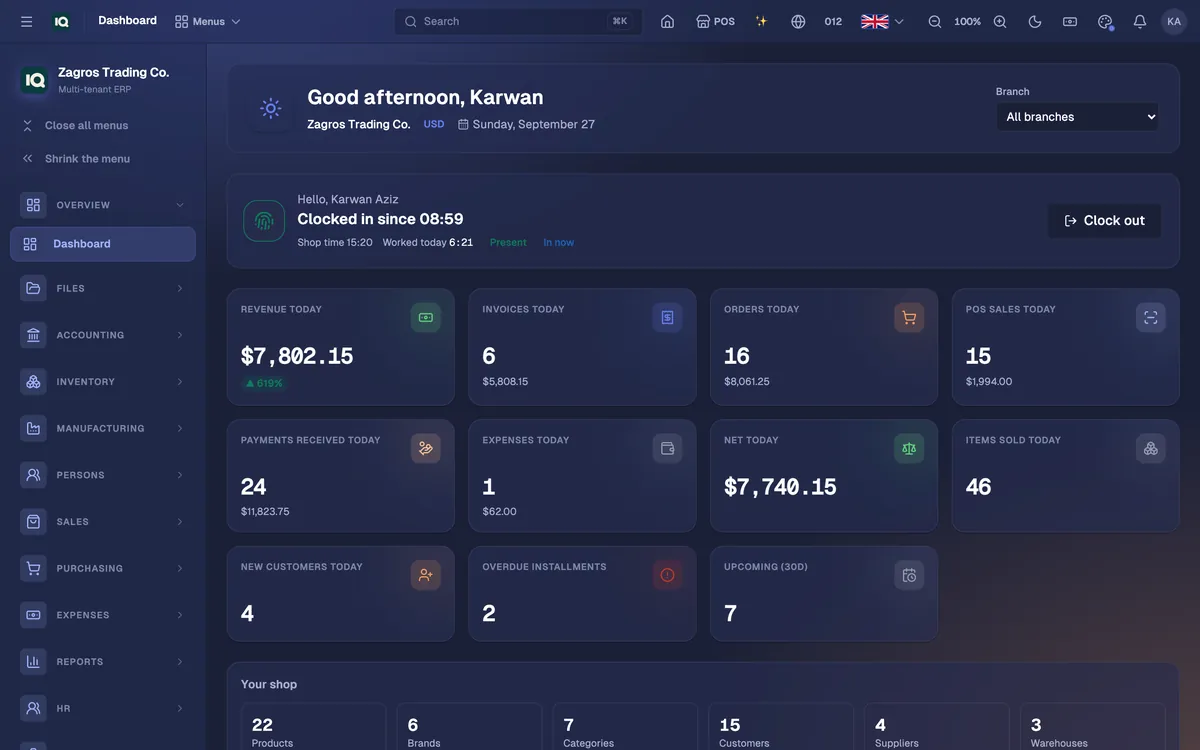
One system for the whole company
92 features across 14 areas share one set of records — so a sale at the till is already in the books, the stock and the customer's statement.
Accounting & finance
Double-entry books that keep themselves: invoices, bills, payments, expenses and payroll all post balanced journal entries as they happen.
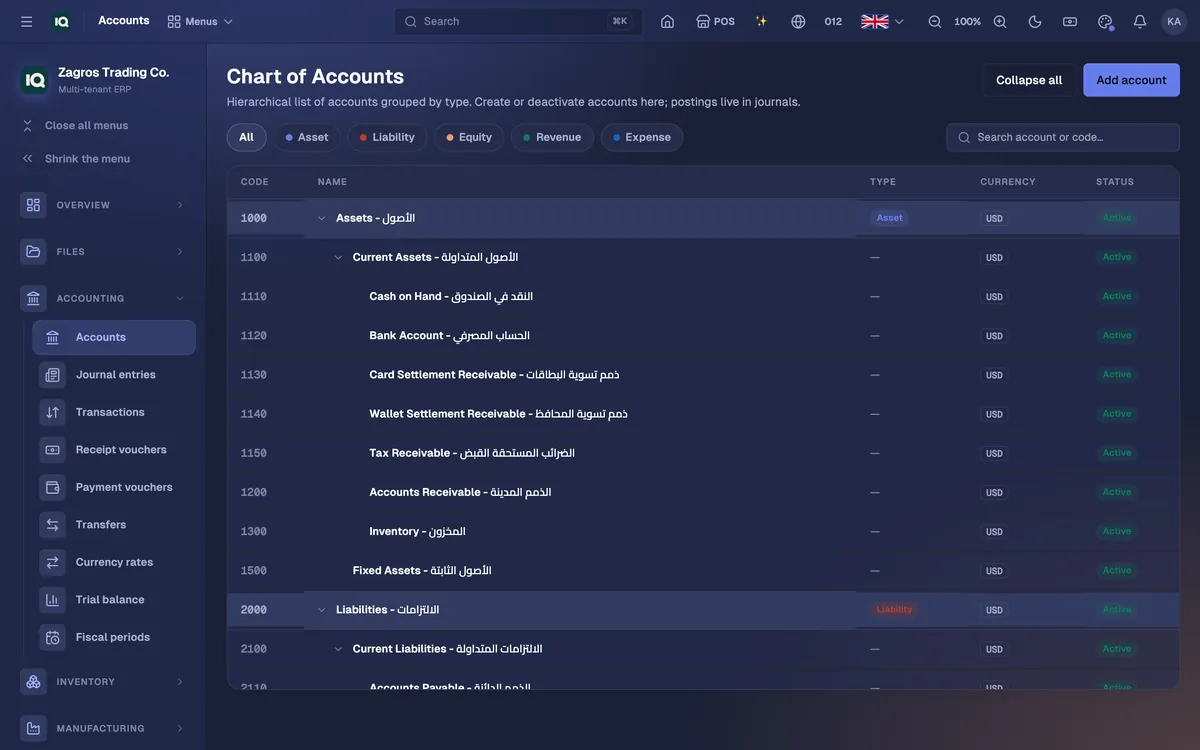
- Chart of accountsA ready account tree, yours to extend, protected against loops.
- Journal entriesManual entries with reversal and printable vouchers.
- Receipt & payment vouchersسند قبض and سند دفع that post balanced entries.
- Cash & bank transfersMove money between cash boxes and bank accounts.
- ExpensesRent, utilities, supplies — posted to the ledger the moment you record them.
- Multi-currencyEvery amount keeps its own currency; exchange rates are kept by date and never mixed.
- Sales taxOptional tax on every document, with an Iraq setup ready to switch on.
- Fiscal periodsClose a period so nothing is posted into it by mistake.
- Trial balanceThe whole ledger on one page, always in balance.
Built for how business works in Iraq
Dinars and dollars, side by side
Every amount keeps its own currency and exchange rates are kept by date. A shift that took IQD and USD counts each drawer separately — they are never added together.
Kurdish and Arabic, properly
The whole interface in Kurdish Sorani, Kurdish Badini or Arabic — right to left — or in English or German, chosen per person. Invoices print in Arabic, English or both.
Keeps selling when the internet drops
The Windows cashier app and the reps’ phone app work offline and sync on their own when the connection returns — without duplicate sales.
Payments the way they happen here
FIB Online at the store checkout, cash in more than one currency at the counter, and receipt vouchers (سند قبض) and payment vouchers (سند دفع) in the books.
WhatsApp built in
Send an invoice to a customer on WhatsApp in one tap, and let customers sign in with a code sent to their WhatsApp.
Installments, mandobs and cashback
Sell on installments with a schedule and late fees, send field reps out with their own app, and reward regulars with cashback.
The office, the counter, the road and your customers’ phones
The same accounts and the same stock behind every screen. Staff install the apps from inside the ERP.
The office
The full ERP in any browser — accounting, purchasing, HR, reports and settings.
The counter
A cashier app that keeps selling with no internet, prints 80 mm receipts and syncs when the line is back.
The manager
Run the whole system from a PC — and keep adding products, editing prices and counting stock while the internet is down.
The road
The mandob app: customers on a map, orders, cash collection and proof-of-delivery photos — offline too.
Your customers
A shopping app to browse, order and track deliveries — with stories, push messages and their own account.
Your website
An online store on your own domain, with FIB checkout and delivery fees by city.
See it working
Real screens from the running system, filled with made-up demo data. Open any of them full size.
Every module, at a glance
Switch off what you do not use and the menus stay short; switch it back on when the business grows.
Accounting & finance
- Chart of accounts — A ready account tree, yours to extend, protected against loops.
- Journal entries — Manual entries with reversal and printable vouchers.
- Receipt & payment vouchers — سند قبض and سند دفع that post balanced entries.
- Cash & bank transfers — Move money between cash boxes and bank accounts.
- Expenses — Rent, utilities, supplies — posted to the ledger the moment you record them.
- Multi-currency — Every amount keeps its own currency; exchange rates are kept by date and never mixed.
- Sales tax — Optional tax on every document, with an Iraq setup ready to switch on.
- Fiscal periods — Close a period so nothing is posted into it by mistake.
- Trial balance — The whole ledger on one page, always in balance.
Sales
- Quotations — Priced estimates that convert to orders or invoices.
- Sales orders — Orders from the office, the reps and the online store in one list.
- Invoices — Posting one records the revenue, the receivable and the stock that left.
- Returns — Credit notes, with the goods back on the shelf if you choose.
- Customer payments — Receive against one invoice or several; paid invoices close themselves.
- Customers — Payment terms, credit limits, a map location and their own price list.
- Price lists — Wholesale, VIP or any group: a discount rule or exact prices with quantity breaks.
- Discounts — Standing rules off a product, brand, category or the whole catalogue.
- Bundles — Sell a set at one price; the items inside come off the shelf.
- Customer requests — New customers who asked for a special price group wait for your approval.
- Share and print — Every invoice prints, and opens from a link with a QR code.
Purchasing
- Suppliers — Supplier accounts with balances and payment terms.
- Bills — Receive stock into a warehouse, with the supplier’s own invoice number.
- Supplier payments — Pay one bill or several.
- Supplier returns — Debit notes for goods sent back.
- Payables aging — What you owe and for how long, in five buckets.
Inventory
- Items — Categories, brands, images, several barcodes, and pack units such as piece, pack and carton.
- Variants — Colour, size or model — each with its own price, stock and barcode.
- Warehouses — Stock held per warehouse or branch.
- Stock movements — Every in and out, with its document and its cost.
- Transfers — Shipped, in transit, received — with a printed transfer note.
- Stocktakes — Count the shelf and post the difference.
- Batches & expiry — Lots with expiry dates, soonest to expire first.
- Spreadsheet import — Update prices and stock from an Excel sheet in Arabic or English, matched by barcode — never duplicated.
- Labels & barcodes — Print product labels and set your own numbering.
Point of sale
- POS register — Scan or search, sell by piece or carton, apply coupons and cashback.
- Customer screen — A second display that mirrors the cart live for the customer.
- Shifts — Open with a counted drawer; close with a Z-report and cash counted per currency.
- Refunds & voids — Take back single lines or void a whole sale.
- Terminals — Every register, lane or checkout, each with its own sales.
- Windows cashier app — Keeps selling with no internet and syncs when the line is back.
- Held sales & receipts — Park a ticket, serve the next customer, print 80 mm receipts.
HR & payroll
- Employees — Staff records placed in departments and positions.
- Organization — Departments and job titles in an org chart.
- Attendance — Schedules and holidays, a PIN kiosk, self clock-in, and punches imported from fingerprint devices.
- Time off — Leave types, balances, requests and approval.
- Payroll — Tax brackets, late and absence deductions, overtime; review payslips, approve, post to the ledger.
CRM
- Leads — Convert a lead into an account, a contact and an opportunity in one step.
- Opportunities — Your pipeline stage by stage — quote, win, lose or reopen.
- Accounts & contacts — Companies and the people you deal with there.
- Activities — Calls, emails, meetings, notes and tasks against each deal.
Installments
- Installment plans — Principal, term and frequency make the schedule; late fees apply after the grace period.
- Collections — What is overdue today and what falls due soon.
- Installment reports — What is outstanding and what has been collected.
Online store
- Storefront — Shop, categories, brands, cart, wishlist, guest checkout and order tracking.
- Your own domain — Point your domain at it and the HTTPS certificate is issued automatically.
- Website editor — Pages, menus, the homepage slider and reviews, edited from the ERP.
- Online orders — Store and app orders, ready to invoice and deliver.
- Checkout — Cash on delivery, bank transfer, pay later or FIB Online — or order over WhatsApp.
- Reviews — Customers rate products; reviews show once you approve them.
- Shopping assistant — An AI chat in the store that finds products and adds them to the cart.
- Customer portal — Customers see their orders, invoices, statement, payments and cashback.
- Customer app — An Android app your customers install to browse, order and track deliveries.
Marketing & loyalty
- Coupons — Percentage or fixed codes with limits, for the register, invoices and the store.
- Cashback — Money-valued rewards with an earn rate per channel, caps and expiry — posted to the books.
- Stories & highlights — Instagram-style stories in your customer app, with products to tap and buy.
- Push notifications — Message everyone, one price group or one customer.
- WhatsApp — Send invoices and messages to customers in one tap, from your templates.
Delivery & field sales
- Dispatch board — Assign orders to drivers and track them to the door.
- Drivers — Each driver sees their own deliveries and adds a proof-of-delivery photo.
- Delivery cities — The cities you deliver to, each with its own fee.
- Mandobs — Field reps on salary or salary plus commission, with a territory and payouts.
- Field orders — Orders reps take on the road, delivered into invoices.
- Mandob app — Customers on a map, orders, cash collection and proof-of-delivery photos — offline too.
Manufacturing
- Recipes — What each product is made of, plus labour, electricity and packaging costs.
- Production orders — Components come off the shelf and the finished goods go on when the order is posted.
Reports & AI
- Dashboard & statistics — Sales, profit and stock at a glance.
- Profit by product — What each product actually made you.
- Profit & loss and balance sheet — Straight from the ledger.
- Receivables & payables aging — Who owes you, and whom you owe, in five buckets.
- Expense report — By category and month, per currency.
- AI reports — Written analysis of your live numbers: trends, best sellers, what to reorder.
- AI assistant — Ask about your data in writing or out loud and hear the answer.
- AI image studio — Product images from a text prompt.
Settings & control
- Users & roles — Custom roles over 140 permissions; staff can be kept to their own branch.
- Audit log — Who changed what, and when.
- Modules — Hide what you do not use; the data stays and returns when switched back on.
- Custom fields — Extra fields on your products, shown in the store if you want.
- Languages — English, Arabic, Kurdish Sorani, Kurdish Badini and German — chosen per person.
- Printing — Invoices on A4 or A5 — in Arabic, English or both — even on your pre-printed letterhead.
- Files — Folders and one hub for every file uploaded across the system.
- Phone sign-in — Customers sign in with a code sent over WhatsApp.
- Telegram alerts — New sales, online orders, invoices and payments sent to a Telegram bot.
Priced for your company
- Quoted per company after a short call: tell us what you sell, how many people will use it and how many shops or warehouses you run.
- Switch on only the modules you need — the rest stay out of the menus until you want them.
- Hosted and run by Vylo, with updates and a database backup every night.
- The cashier, manager, rep and customer apps are installed from inside the ERP and update themselves.
From first call to first sale
- 1See it with your own dataA demo on WhatsApp or in person — bring a price list and a few invoices.
- 2Your company is createdYour own organization with its currency, language, users and roles, and the modules you need switched on.
- 3Import your itemsLoad prices and stock from your existing Excel sheet; items are matched by barcode.
- 4Install the appsCashiers, reps and managers download their apps from inside the ERP — and you start selling.
What does IQ ERP cover?
Accounting, sales, purchasing, inventory, a point of sale, HR and payroll, CRM, installments, delivery and field sales, manufacturing, an online store with a customer app, and reports with an AI assistant — in one system with one set of records.
Does it work in Kurdish and Arabic?
Yes. The whole interface is available in Kurdish Sorani, Kurdish Badini and Arabic (right to left), as well as English and German, chosen per person. Invoices print in Arabic, English or both, and the cashier, rep and customer apps are in Arabic and English.
Can we keep our books in both dinars and dollars?
Yes. Every amount is stored with its own currency, exchange rates are kept by date, and cash drawers are counted separately for each currency.
What happens at the till when the internet goes down?
The Windows cashier app keeps selling. The catalogue is kept on the machine, sales queue up locally and sync on their own when the connection returns, without creating duplicates.
Can our customers order online?
Yes. Your catalogue becomes an online store — on your own domain if you like — with FIB Online payments, delivery fees by city and order tracking. There is also a customer app and a portal where customers see their invoices, statement and cashback.
Where is our data kept?
On Vylo’s servers. Every record belongs to one company and is only served to that company’s users, the database is backed up every night, and the audit log shows who changed what and when.
Can we start small?
Yes. Switch off the modules you do not use — they disappear from the menus and their data is kept — and turn them on as the business grows.
See IQ ERP with your own numbers
A walkthrough on WhatsApp or in person in Duhok: bring your price list and a few invoices and we will show them in the system.